
Devices
|
Word |
Meaning (English-English) |
المعنى |
|
app |
a small computer program on a mobile phone or other device |
تطبيق |
|
device |
an electronic gadget, e.g. a phone or a tablet |
جهاز |
|
digital camera |
A camera that takes pictures electronically |
كاميرا رقمية |
|
e-reader |
a device for reading digital books and magazines |
جهاز لقراءة الكتب إلكترونيًا |
|
headphones |
a device worn on the head to listen to sound from a phone or other device |
سماعات للأذن |
|
laptop |
a small computer that you can carry around |
حاسوب محمول |
|
password |
a secret word that lets you do something, e.g. use your computer |
كلمة سر |
|
printer |
a machine that makes copies of documents, pictures or photos on paper |
طابعة |
|
screen |
the part of a TV or computer that shows images |
شاشة |
|
smartphone |
a mobile phone that is like a small computer and that connects to the internet |
هاتف ذكي |
|
speaker |
the part of a computer or smartphone which the sound comes out of |
مكبر صوت |
|
website |
pages on the internet where someone puts information |
موقع على الإنترنت |
Using Technology
|
Word |
Meaning (English-English) |
المعنى |
|
click on an icon |
to press part of a device, e.g. a computer, to make it do something |
النقر على ايقونة |
|
download an app |
Get a program from the internet onto your device |
تحميل برنامج |
|
go online |
Connect to the internet |
الاتصال بالإنترنت |
|
press a button |
Push a physical or virtual button to do something |
اضغط على زر |
|
search the internet |
Look for information online |
البحث عن معلومات على الإنترنت |
|
send a message |
Write and deliver a text to someone |
إرسال رسالة |
|
take a selfie |
Take a photo of yourself |
التقاط صورة لنفسك |
|
turn off the TV |
Stop the television from working |
إيقاف تشغيل التلفاز |
|
turn on the computer |
Start the computer |
تشغيل الحاسوب |
|
type a password |
Enter a secret word to log in |
كتابة كلمة السر للدخول |
|
upload a photo |
Send a photo from your device to the internet |
رفع صورة |
|
watch a video |
View a moving picture with sound |
مشاهدة فيديو |
1 Work in pairs. Look at the WOW! Magazine Welcome page. Then read and answer the WOW! Question. Student's own answer
2. Look and match. Then listen, check and repeat.

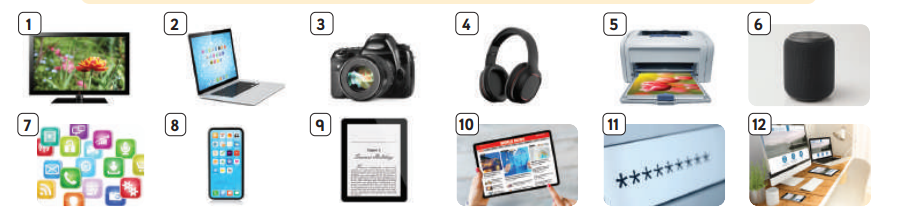
3.Listen and read. Who uses technology for school work? Alia 
 I like TV! It isn’t very modern, but I love watching sports on TV. Sometimes I watch on my tablet, but I like the TV best because the screen is bigger!
 I love my digital camera. It takes better photos than my smartphone, but the smartphone is good if you want to send photos quickly to your friends.
 I often listen to audiobooks on my smartphone. I haven’t got a speaker. I use headphones, but sometimes I can’t hear when Mum calls me for dinner!
 I think technology’s great, especially for doing school work. I always do homework on my laptop and send it to the school homework website.
4 Work in pairs. Think about the kinds of technology in Activity 2. Answer the questions.
1 Which devices have got screens? laptop, digital camera, smartphone, e-reader
2 Can you name three things you can do with a smartphone? take photos, send photos, listen to music.
3 Can you put these things in order of size? Start with the biggest. computer, laptop, headphones, smartphone
5 Work in groups and answer the questions. Student’s own answer