LESSON 2A VOCABULARY|Computer equipment
1 Complete descriptions 1–9 below with the words from the box.
desktop computer hard disk laptop battery scanner screen speakers
USB cable wireless keyboard wireless mouse
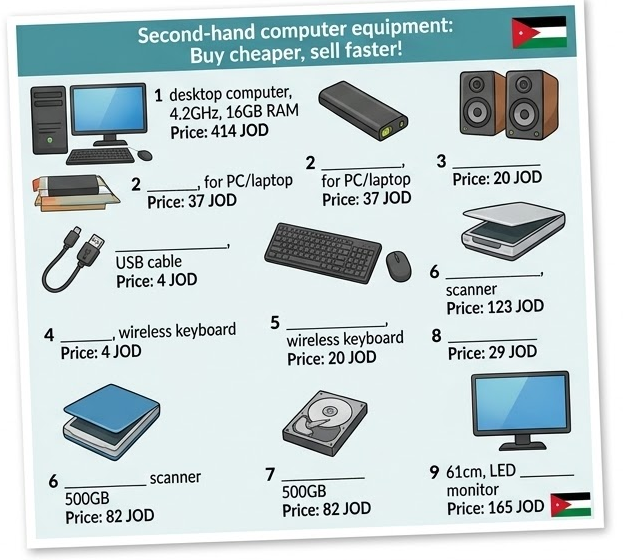
2 Which items of computer equipment in Exercise 1do you have in your room? Discuss in pairs.
3 Complete the sentences with the verbs from the box.
charge print scan switch off turn up type
1 How often do you need to charge the battery on your phone? 2 Do you your computer when you go to bed? 3 Can you without looking at the keyboard?
4 Do you your speakers when you’re home alone?
5 Can your printer and ?
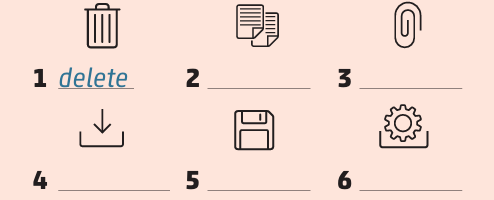
4 Match the verbs with the icons.
attach copy delete download install save
5 SPEAKING In pairs, answer the questions.
1 What do you do with emails and text messages after you read them?
2 How many apps did you install on your phone last week? What were they?
3 Do you check your phone after going to bed? Is it a good idea? Say why.
LESSON 2B VOCABULARY | Computer equipment
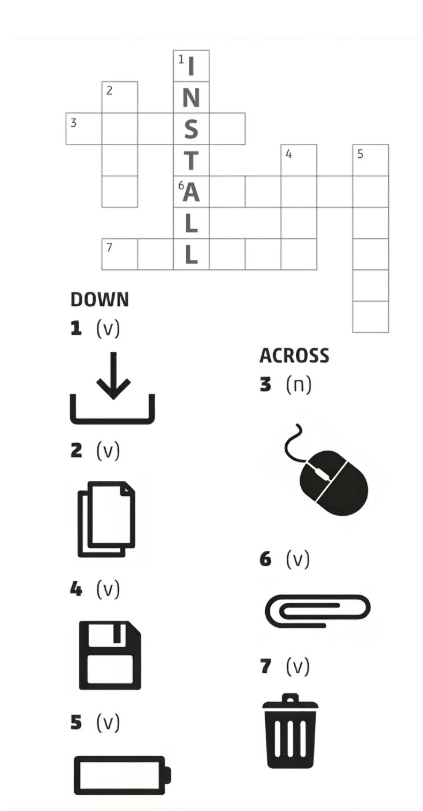
1 Complete the crossword with verbs (v) or nouns (n).
2 Complete the sentences with the words from the box.
battery | cable | desktop | disk | screens | wireless
-
This laptop __________ is very old. It lasts for half an hour.
-
You can connect your phone to your laptop using a USB __________. It's very easy.
-
My parents still have an old __________ computer. It's very heavy and slow.
-
You spend all day looking at __________ – on your phone, your laptop and the TV.
-
The computer has a 1TB hard __________. I have lots of files!
-
A __________ mouse is good – you can move it easily.
3 USE OF ENGLISH Complete the second sentence using the word in bold.
1 I need to give my battery more energy so that I can use my phone when I go out. (CHARGE) I need to __________ __________ __________ so I can use it when I go out.
2 Could you make the volume louder, please? I can't hear it. (UP) Could you __________ __________ the volume, please? I can't hear it.
3 You don't need a cable when you use a wireless keyboard. (TO) You don't __________ __________ __________ a wireless keyboard to your computer with a cable.
4 It's easy to get new apps and put them onto your phone. (INSTALL) It's easy to __________ __________ on your phone.
4 Describe your computer or other device using the words from the lesson.
Lesson 2A – Computer Equipment
answers
1 Complete the descriptions
-
desktop computer
-
speakers
-
laptop battery
-
USB cable
-
wireless mouse
-
scanner
-
hard disk
-
wireless keyboard
-
screen
2. Students’ own answers
3 Complete the sentences
-
charge
-
switch off
-
type
-
turn up
-
print and scan
4 Match the verbs with the icons
-
delete
-
copy
-
attach
-
download
-
save
-
install
5. Students’ own answers
Lesson 2B – Computer Equipment
Answers
1.
2copy 3 mouse 4 save 5 charge 6 attach 7 delete
2.
2 cable 3 desktop 4 screens 5 disk 6 wireless
3 Use of English
-
I need to charge my battery so I can use it when I go out.
-
Could you turn up the volume, please?
-
You don't need to connect a wireless keyboard to your computer with a cable.
-
It's easy to install apps on your phone.
4 Example answer (Description)
My computer is a desktop computer.
It has a screen, wireless mouse, and wireless keyboard.
I use a USB cable and sometimes I download apps and save files.