Fun Time 4 Kids
the drawing and painting app
Great fun!
by Randa Aladib This is a great app for kids who like being creative. You can use it to make fantastic pictures!
Positive points:
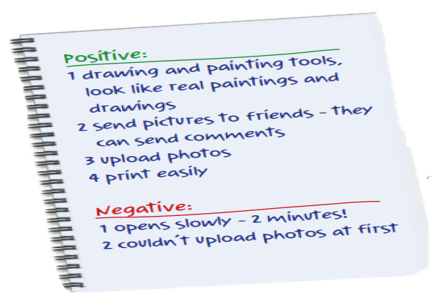
1 There are tools for painting and (1) drawings. My pictures look like real paintings and drawings!
2 You can send your pictures to your friends, and they can send you (2) Comments.
3 You can upload (3) Photos, too, and draw or paint on your photos.
4 You can (4) Print the pictures easily.
Negative points:
1 It opens too slowly. I had to wait for two (5) minutes after I typed my password!
2 I couldn’t (6) Upload photos at first, but it’s OK now.
How to Write a Review
Purpose
- A review tells other people what you think about an app or game.
- It includes both positive and negative points, so readers know the good and bad features.
Step 1: Plan
- Use notes first – you don’t need full sentences.
- Identify:
- What you liked (positive points)
- What was difficult or not perfect (negative points)
Example of planning notes:
- Positive: drawing tools, upload photos, print easily
- Negative: opens slowly, couldn’t upload photos at first
- Start with a simple sentence about the app/game.
- Example:
- “FunTime4Kids is a great app for kids who like drawing.”
- “TopCity is a fun game for children who enjoy solving problems.”
Usage:
- The introduction gives context. Readers know what the review is about.
Step 2: Write a Short Introduction
- Start with a simple sentence about the app/game.
- Example:
- “FunTime4Kids is a great app for kids who like drawing.”
- “TopCity is a fun game for children who enjoy solving problems.”
Usage:
- The introduction gives context. Readers know what the review is about.
- Step 3: Write Positive Points
- Use phrases like: “You can…”, “It helps you…”, “I like…”
- Use adjectives: brilliant, fantastic, easy, fun
- Use adverbs: easily, quickly, slowly
Example Sentences:
- “You can upload photos and send them to your friends.”
- “It is easy to use and very fun.”
Step 4: Write Negative Points
- Write what is difficult or annoying about the app.
- Use phrases like: “It opens too slowly”, “I couldn’t…”
- Use polite language: “but it’s okay now”
Example Sentences:
- “It opens slowly at first, but it works fine now.”
- “I couldn’t upload photos immediately, but it’s better now.”
Step 5: Check and Rewrite
Re-read your review.
Check spelling and grammar.
Make sure your positive and negative points are clear.
Step 6: Vocabulary & Phrases to Use
|
Phrase |
Usage Example |
|
You can… |
“You can send photos to friends.” |
|
I like… |
“I like the drawing tools.” |
|
It is… |
“It is easy to use.” |
|
Positive point |
“A positive point is the upload feature.” |
|
Negative point |
“A negative point is that it opens slowly.” |
|
Adjectives |
brilliant, fantastic, fun, easy, difficult |
|
Adverbs |
easily, quickly, slowly |